
PerfectLum Suite3.8 - Download
You'll be able to download in few seconds.
Publisher Description
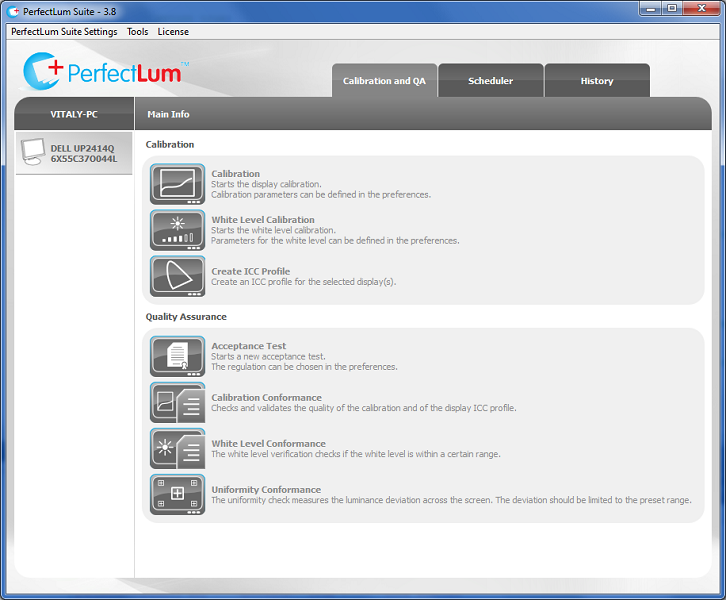
PerfectLum Suite display calibration and QA software is a handy tool, allowing to calibrate a monitor to DICOM, CIE L*, and Gamma, and perform QA tests to international standards. PerfectLum Suite uses test patterns to provide visual representation of display calibration. The software can improve image quality of nearly any display to meet medical industry requirements. Featuring display color calibration and ICC profiling, PerfectLum Suite is helpful in handling color on color medical displays. With its Remote display control, PerfectLum enables a QA supervisor to calibrate a monitor with one click, no matter where it is located, without interrupting the workflow on a workstation.
PerfectLum Features:
- NEMA DICOM calibration, CIE L* and Gamma calibration
- white level and black level calibration
- calibration to certain color temperature and XY coordinates
- automatic display adjustment via DDC/CI channel
- uniformity correction
- hardware calibration
- ICC profile generation (version 4 profiles)
- DICOM conformance
- white level check
- uniformity check
- SMPTE, Briggs, AAPM test patterns to check calibration results visually
- calibration of up to 6 displays connected to a workstation
- history database with detailed reports
- database backup
- scheduler to plan tasks and get reminded about them
About PerfectLum Suite
This System Maintenance program is available in English, ChineseSimplified, German, Japanese, Korean. It was last updated on 29 September, 2026. PerfectLum Suite is compatible with the following operating systems: Mac, Windows.
The company that develops PerfectLum Suite is QUBYX. The latest version released by its developer is 3.8.
The download we have available for PerfectLum Suite has a file size of 76.5 MB. Just click the green Download button above to start the downloading process. The program is listed on our website since 2014-08-22 and was downloaded 0 times. We have already checked if the download link is safe, however for your own protection we recommend that you scan the downloaded software with your antivirus. Your antivirus may detect the PerfectLum Suite as malware if the download link is broken.
How to install PerfectLum Suite on your Windows device:
- Click on the Download button on our website. This will start the download from the website of the developer.
- Once the PerfectLum Suite is downloaded click on it to start the setup process (assuming you are on a desktop computer).
- When the installation is finished you should be able to see and run the program.
Program Details
General
System requirements
Download information
Pricing
Version History
version 3.8
posted on 2014-08-22
faster and more precise calibration, NY PDM regulation integrated, BT.1886 calibration type added, Windows 8.1 compatibility, extended hardware support
version 2.1
posted on 2009-09-21
-CIE L*, DICOM and Color calibration
-white level calibration
-uniformity adjustment of the display with Matrox XENIA board
-support for Matrox and Realvision graphiccards
-remote control
-scheduler
-PDF export of history data
-PerfectContrast. Automatic adjustment of contrast to optimum
Disclaimer
External Download
We do not host PerfectLum Suite on our servers. We did not scan it for viruses, adware, spyware or other type of malware. This app is hosted by the software publisher and passed their terms and conditions to be listed there. We recommend caution when installing it.
The external download link for PerfectLum Suite is provided to you by apps112.com without any warranties, representations or guarantees of any kind, so access it at your own risk.
If you have questions regarding this particular app contact the publisher directly. For questions about the functionalities of apps112.com contact us.
